A stock watchlist with YTD and 1-year returns
Stock Buddy is a free, web-based watchlist that shows every stock's year-to-date and 1-year return in columns, side by side, next to its price, market cap, and dividend yield. No ads, no app to install.
Open the watchlist Free. Works on any phone or computer.
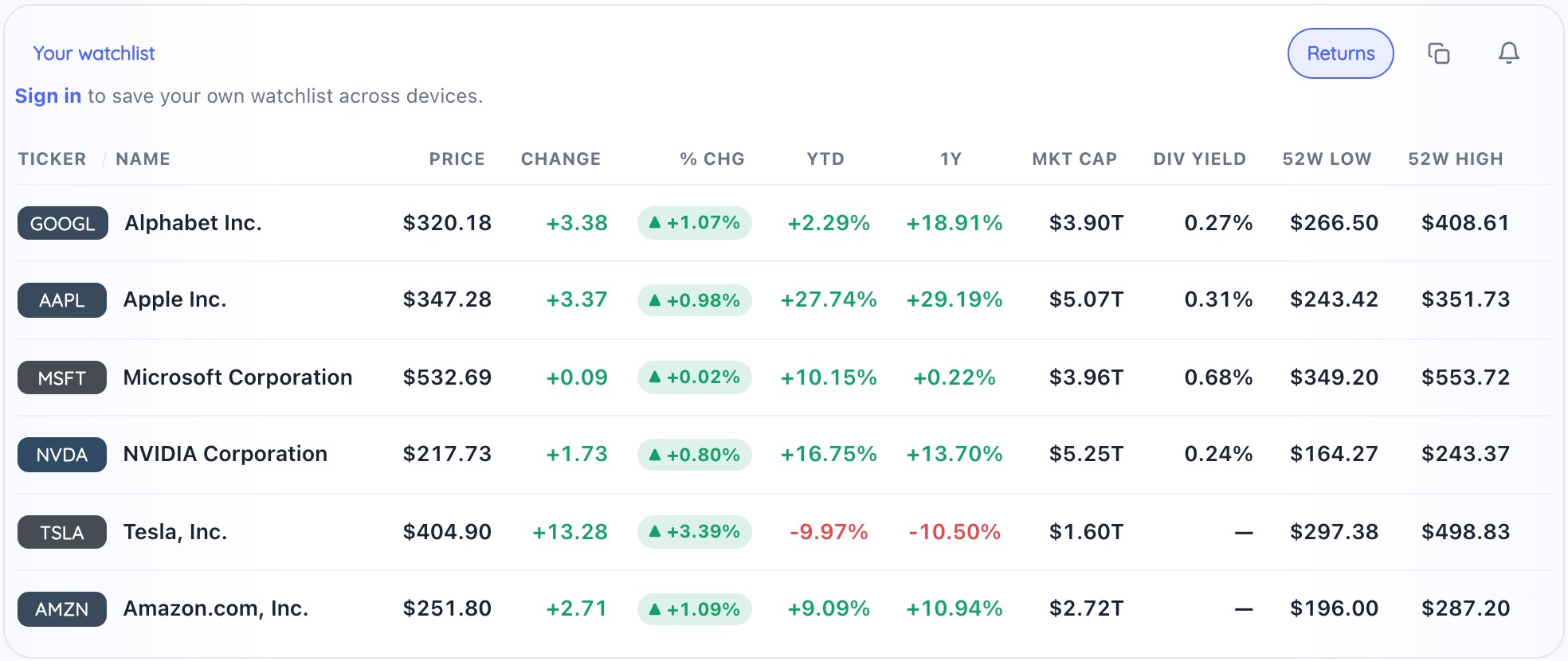
Returns turned on: YTD and 1Y sit next to the day's change for every stock on the list.
How to turn it on
- Open heystockbuddy.com and add the stocks or ETFs you follow to your watchlist.
- Click Returns above the list. YTD and 1Y columns appear for every stock.
- Click either header to sort by it. Click Returns again to hide the columns; the setting is remembered.
On a phone the list starts compact. Tap Show all columns under the list to see the returns, then swipe sideways.
Why side by side matters
Most finance sites show a stock's YTD return on its own page, one stock at a time. If you want to know which of your ten stocks is having the best year, you end up opening ten tabs or keeping a spreadsheet. With the returns on the watchlist, the answer is one glance, or one click on the column header.
It also keeps the day's move in perspective. A stock down 3% today but up 25% for the year reads very differently from one that is down 3% and down for the year.
How the numbers are calculated
| Column | Measures |
|---|---|
| % Chg | Today's change from the previous close |
| YTD | Change since the last close of the previous year |
| 1Y | Change since the close one year ago (or since the first trading day, for stocks younger than a year) |
All three are price returns, adjusted for splits. Dividends are not added back, so for income stocks and funds the total return is somewhat higher than what you see here. The Div Yield column on the same list shows what they pay.
What it doesn't do
It doesn't show total return with dividends reinvested, it doesn't cover stocks listed only outside the US, and it doesn't show yields for money market funds. It is a tracker, not a broker: there's no trading and no advice.
Common questions
Is there a free stock watchlist that shows YTD and 1-year returns?
Yes. Stock Buddy is a free, web-based watchlist with YTD and 1Y columns next to price, day change, market cap, and dividend yield. Click Returns above the list to show them. There are no ads and nothing to install.
How do I compare the YTD performance of several stocks?
Add the stocks to your watchlist and turn on Returns. Every stock's year-to-date and 1-year return sits in the same two columns, so you can read across or click a column header to sort by it. To see the paths over time, open any stock and add up to three more to its chart.
Does the return include dividends?
No. YTD and 1Y are price returns: the change in the share price, adjusted for splits. Dividends are not added back, so a high-yield stock or fund will look a little worse here than its total return.
How is the YTD return calculated?
It compares today's price with the last closing price of the previous year. The 1Y column compares today's price with the close one year ago. If a stock has traded for less than a year, 1Y measures from its first trading day.
Can I sort my watchlist by return?
Yes. Click the YTD or 1Y header to sort from best to worst, and click again to reverse it.
Does it work for ETFs?
Yes. ETFs work the same way as stocks, so you can line up something like SPY, QQQ, and SCHD and compare their returns in one table.
Can I get the returns into a spreadsheet?
Yes. The copy button above the list copies every column, including YTD and 1Y, ready to paste into Excel or Google Sheets.
Do I need an account?
No account is needed to look up stocks or try the sample list. Sign in with Google or email, free, to build your own watchlist and keep it on every device.
See also: a simple stock tracker · free stock price alerts by email · Stock Buddy vs Google Finance · Stock Buddy vs Yahoo Finance · about